
What is the Best Camera for Live Streaming Church?


At a church video live streaming company, we get a lot of questions about the gear we recommend. One of the most common questions we get is about the camera, obviously.
It usually sounds something like this: “what’s the best camera for live streaming church?”
In reality, it depends. The best camera is probably a $35,000 camera like the RED series of 8K cinema cameras. But if your budget is $1,500 for a camera, the RED couldn’t be the “best” for your needs, right?
Best is subjective. So asking which camera is best in a cookie-cutter manner is the wrong question. The right question is, “which camera best fits my particular needs and budget?”
Finding the Best Camera for Live Streaming Church
Since we can’t definitively say which camera is best for every situation, what we can do is give you some variables that you should consider that will help you narrow down the best fit for your needs.
Let’s get into it!
What to Look for in a Live Streaming Camera
There are three things I like to look for in a live streaming camera:
- Is the image good when I see its final result?
-
- Getting a cheap camera might save you money, but the image will find you out – especially in low-light situations.
- Does it fit the way I want to produce a stream?
- If you want to remotely control a camera, a handheld is not the best option. And, if you want someone to roam around with the camera, a PTZ is not your best option. We want to fit the gear to the need.
- Does it fit my budget?
- Again, you should get the best camera you can afford. Don’t cut corners, but you don’t have to buy a $35K camera, either.
A Word About Budget
The truth is, you get what you pay for.
I can’t count how many people have purchased a knock-off camera on Amazon to save a buck, only coming to us begging for help because it breaks or looks horrible.
Camera gear is expensive for a reason. The more expensive, the better quality.
However, unless you’re a professional videographer, there is a point where the rate of return slows down dramatically. For most people, when you get over $2,500 price mark for a camera, you probably won’t tell a difference between that and the $35k camera. So, at some point, there’s no reason to go “more expensive.”
Still, always get the best quality camera you can possibly afford. Your future self will thank you for it.
Great Handheld Cameras

By handheld, we mean “manually controlled” cameras. These can be on a tripod, but they are meant to be either set or operated by an actual person who knows how to run the camera.
Some will call these point-and-shoot, others handheld, and others will refer to all cameras in this genre as “DSLR,” though most of them are technically mirrorless cameras these days.
But, you get the picture.
These cameras are usually 4K at the very least and have a variety of features that make them a really good bang for your buck, so to speak. The image quality is usually great, more than enough to have a crisp, clear live stream.
Here are some of our favorite handheld-based streaming kits.
Blackmagic Design Studio Camera

This camera comes in two flavors, the 4K and the 6K, with a couple of variations beyond that. For live streaming, there is no reason to have a 6K camera – or even 4K for that matter. But the price of these broadcast-quality camera systems is such that makes them an awesome deal.
If you’re going to have a camera on a tripod, with a video operator running it, the studio camera is amazing. Its larger 7” screen makes it easier to see focus and exposure in the moment.
It has a built-in tally light, and also a built-in comms connection over SDI to most Blackmagic switchers.
The drawback for all Blackmagic Design cameras is the lack of continuous autofocus. They are manual cameras, meaning focus only changes when you want it to and doesn’t happen automatically.
Blackmagic Design Pocket Cinema Cameras

These cameras are basically the same as the Studio camera but are meant to be handheld rather than mounted. For roaming cameras and such, these cameras are really great – and affordable.
With both Blackmagic cameras, you can actually control most of the exposure settings via the ATEM switcher software.
This camera also doesn’t have continuous autofocus. But with a dedicated operator, pulling manual focus or using the button-push autofocus on demand is more than sufficient for most uses.
Here are some of our Pocket Cinema Camera Streaming Kits
Sony a6600
This is one of our favorite cameras. The image quality is amazing, shooting at 4K/30fps. And the camera features IBIS or In-Body Stabilization. When put together with a stabilized lens, you can get really smooth hand-held footage without a gimbal.
There really is no downside to this camera, in our view. It’s an awesome middle-of-the-road camera that has an amazing image.
And a bonus is that Sony has the best autofocus in the industry. Their camera will lock onto the face or eye of the subject, and the focus tracking does amazing.
In fact, we use this camera right now in our studio, and we leave it on autofocus all the time.
Sony FX30
This is a brand new release by Sony, and at the time of writing, hasn’t even been publicly released yet. Though, everyone who has early access to this camera gives it rave reviews.
This is meant to be a cinema camera from Sony. The Alpha series is really a photography/video device – being great for both. The FX30 is a film device, and it’s designed to be a cinema camera along the lines of the Pocket Cinema cameras from Blackmagic Design.
For live streaming, again, this might be overkill. However, if you want to do postproduction, recording internally at 10-bit 4:2:2 means you will have amazing footage to work with in post-production.
Great Remote Controlled Cameras
For churches, this is the camera most will want to use for live streaming. A lot of churches don’t like the idea of having a large camera tripod and camera operator in the middle of everything and everyone.
PTZ (pan, tilt, zoom) cameras make the camera basically disappear from the service – mostly forgotten about by the congregation. And a volunteer with a joystick control board can control all the cameras remotely.
They can pan the camera, tilt it up and down, and zoom it all with the camera mounted on a wall or even the ceiling.
Here are our favorite PTZ Cameras
PTZOptics 2nd Generation Cameras
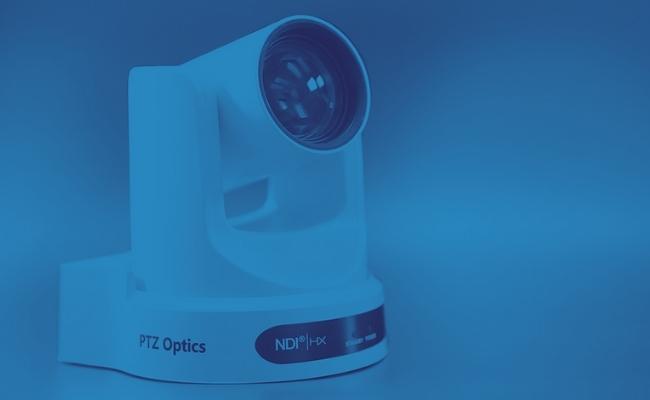
PTZOptics is a great brand with a great YouTube channel you should subscribe to. They happen to make great cameras as well.
They have basically the same camera in 3 flavors, 12X, 20X, and 30X zoom configurations. They also split those 3 flavors into 2 categories: NDI and Non-NDI cameras.
We recommend the non-NDI versions for most of our customers because, unless you have a very robust network, it’s really easy to get in over your head relying on NDI.
These cameras are easy to install, easy to control, and have a great image.
BirdDog PTZ Cameras

This is a brand we absolutely love at ChurchSetup. They are pushing the envelope and innovating, which is more than most camera companies in the PTZ space are doing.
They are on the cutting edge of NDI, but for most churches, NDI isn’t really the best option at this time. Thankfully, their cameras (like PTZOptics) also feature HDMI and SDI connections.
The BirdDog cameras have Sony sensors inside, which means they get very good picture quality, even in low light. While being a little more expensive than the PTZOptics version, the upgrade is worth it if you have the budget.
Their cameras come in a variety of flavors:
The P110 and P120
These cameras are virtually the same, except for the zoom length.
The P200
This is a 30X zoom camera, and one of our best sellers. For larger auditoriums, this is the workhorse camera.
The P4K
This is a 4K version of the previous cameras, and an amazing one at that. However, if you’re just live streaming, this may be overkill for most churches. Where it shines is in recording for post-production in 4K.
See all BirdDog Streaming Kits
Quick Remark About PTZ Cost vs. Handheld
Every now and then we get questions about PTZ camera quality next to a camera like the Pocket Cinema, etc. And we have to explain this, so I figured I would do it here too:
You can’t compare apples and oranges and make a great decision on the comparison.
Yes, both are “cameras” but they are different. The PTZ camera not only features image capturing, but it also includes the remote control software and functionality, as well as the motors to move the camera around and the optical motorized zoom in and out.
Handheld cameras just have to capture the image. The lens does the zooming, operated by hand most of the time. The panning and tilting are done by hand as well.
To get the equivalent of the convenience of the PTZ in a handheld, you would have to invest in thousands of dollars of “hybrid” equipment that is bulky and just kind of dorky to use in a church setting.
Likewise, if you get the same image quality in a PTZ that you would get from a 4K or 6K cinema camera, you would be paying thousands more, upwards of $10-15k per camera.
So, no a $2000 PTZ is not going to have the same cinematic video quality as a 4K handheld camera. But for those watching the live stream, most couldn’t tell the difference anyway, especially if you don’t have all kinds of color correction going on from a professional videographer.
What’s the Best Camera Choice for My Church?
Consider your budget and the style of camera you will need to employ in your live streaming setup. Are you planning to just record and live stream? Or do you plan to do any creative editing and post-production?
If you plan on creative editing, you will definitely want at least one or two handheld cameras to give you different angles and perspectives.
If you plan on just live streaming the event in a broadcast style, there’s no need for super creative viewing angles. Having stationary cameras isn’t that big of a deal. I mean, the caveat is obvious – there are jib and crane shots, the cameras on cables, etc. Those are really more gimmicky shots than broadcast style.
For the most part, if you’re broadcasting, the viewers want to experience the event like they are “in the room.” I’ve been to a lot of churches and have yet to see a zip line installed in any of them. So far, I’ve never witnessed a congregant go zooming through the air. So the camera on the cable, while really cool to do, isn’t something a broadcast audience expects. And even if they think it’s cool as well, it could be completely breaking the immersion of your live stream.
This is a creative choice you will have to make.