
Everything You Need to Build a Professional Live Streaming Setup in 2023 Without Overspending


At churchsetup.com, we receive numerous inquiries from people seeking guidance on live streaming. And it’s not just churches; we’ve worked with high schools, universities like Harvard, and institutions such as the United States Merchant Marine Academy. Each month, we field hundreds of questions related to live streaming, all aimed at achieving a professional, high-quality live stream on a limited budget. We understand the challenge of choosing the right setup, and that’s what drives these inquiries.
One memorable instance involved a church that had hired a local integrator to install a live-streaming setup. To their astonishment, they received a quote exceeding $40,000. Frustrated by the cost, they reached out to us for assistance. We were able to provide them with the exact same hardware, cameras, and switcher for under $9,000. This experience is the reason we exist—to offer affordable solutions.
Among the myriad questions we receive, certain themes repeat themselves consistently. In response to this demand, we’ve created this article to address the most frequently asked question we encounter each day: What do I need for a professional-quality live stream?
Today, we will provide an answer to that question.
Building a Live Streaming Setup in 2023: Everything You Need
Before we delve into the specifics, it’s important to acknowledge that there is an extensive array of brands, cameras, switchers, software, and hardware available. With limitless combinations and options, it’s impossible to cover them all. In this article, we’ll focus on the basics—the essential components you need for a professional live stream—and highlight some of our preferred brands and technologies that meet those requirements. So, let’s get started.
A live streaming and video recording setup can be broken down into five key areas:
- Cameras: First, you need a camera capable of capturing the action as it happens live.
- Audio: Additionally, you require an audio source, such as a microphone, to capture the live sound.
- Production Tool: These camera and audio sources must be connected to a production tool, which can be either a hardware device or software running on a Mac or PC.
- Encoder: The production tool then encodes the video and audio into a file stream, which is subsequently uploaded to an online platform.
- Platform: The platform decodes the file and distributes it to your audience in a watchable format. Lastly, you need a reliable internet connection, which is crucial for seamless live streaming.
1. Cameras
-
- Static Cameras: Static cameras are typically mounted on tripods or handheld, requiring an operator to move them. Traditionally, camcorders were used for this purpose, while professional setups featured larger camcorder-style cameras mounted on sturdy tripods. However, nowadays, small handheld cameras like the Sony Alpha series, Blackmagic Design Pocket Cinema cameras, Canon models, and Panasonic offerings can deliver professional-level footage.
- PTZ Cameras: PTZ stands for pan, tilt, and zoom. PTZ cameras are equipped with motors that allow remote control. With PTZ cameras, a single operator can control multiple cameras from a remote location, such as a sound booth at the back of the room. Additionally, newer PTZ camera models incorporate auto-tracking, which enables automated camera movement to follow a speaker without any manual intervention. PTZ cameras can be mounted on walls or ceilings, making them suitable for event venues where floor-mounted cameras would obstruct the space.
Static cameras are typically powered by batteries or adapters connected to a power source. The only connection required between static cameras and the production tool is the video feed, which can be established through SDI or HDMI cables, or even wirelessly using devices like the Hollyland Mars 400. On the other hand, PTZ cameras need both a video connection and a network connection since their control is done over the network. PTZ cameras utilize fiber optic HDMI or SDI cables for video transmission, along with an Ethernet cable for network connectivity. The advantage is that most newer PTZ cameras can be powered over Ethernet, eliminating the need for nearby electrical outlets. A PoE (Power over Ethernet) switch or hub is typically used to deliver power via the Ethernet cable.
While both camera types offer great options, many of our clients opt for PTZ cameras due to their versatility and remote control capabilities.
2. Audio Sources for Live Streaming
When it comes to audio, there are numerous options to consider. For instance, you can utilize a compact lapel system like the Rode Wireless Go or opt for a shotgun microphone such as the Rode VideoMic Pro. However, in most cases, our clients, particularly churches and event venues, already have professional sound systems in place—commonly known as PA systems. These setups prove to be the ideal choice for live stream applications, as they enable precise audio mixing specifically for the live stream, ensuring optimal sound quality.
Since the live stream should provide a comparable experience to being present in person, it’s crucial to achieve excellent audio quality. To accomplish this, you will require an output from your PA mixer, preferably a subgroup or auxiliary group. This dedicated output allows you to fine-tune the audio specifically for the live stream without affecting the mix and sound output for the in-house speakers. By utilizing this separate channel, you can ensure the live stream audio sounds its best while maintaining the desired audio experience for those attending the event in person.
3. Production Tools for Live Streaming
Production tools play a crucial role in seamlessly blending multiple video and audio sources to create a professional live stream. Software options like OBS (Open Broadcaster Software) provide a popular choice as they are free, open-source, and compatible with both PC and Mac. For more advanced features and professional-level functionality, software options like vMix (PC) and eCamm (Mac) are available. These software titles offer powerful capabilities but require a capable computer to handle multiple sources and encoding tasks. Additionally, capturing video footage from cameras into software often requires capture cards or devices, such as the Cam Link from Elgato (Mac) or internal components like the DeckLink Quad from Blackmagic Design (PC).
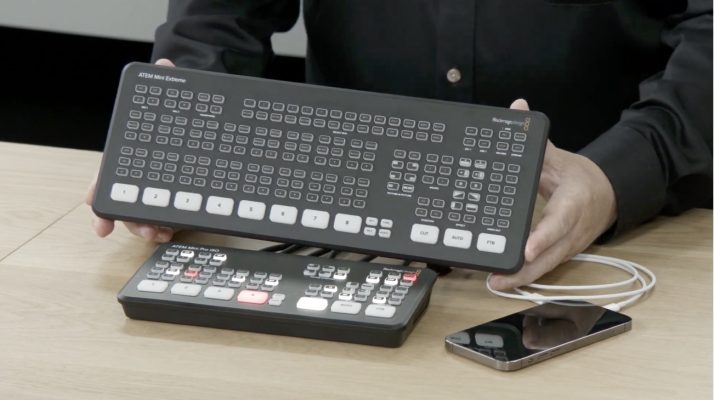
Alternatively, hardware production tools, commonly referred to as video switchers, offer stability and consistency in live streaming. Hardware switchers provide a more reliable solution compared to software, as they are less prone to software-related issues. However, hardware switchers may require additional equipment to implement advanced features like animated overlays or scoreboards. Examples of hardware production tools include the ATEM Mini Pro and ATEM Mini Extreme, which are popular switchers capable of handling multiple video and audio sources.
4. Encoders for Live Streaming
Encoders are essential components that transform the program feed from your video switcher into a continuous video file uploaded in real-time to an online platform. Encoders convert the stream of data into a video format that can be downloaded and viewed by your audience. Software options like OBS double as both production tools and encoders, utilizing computer resources for encoding. Some hardware switchers, such as the ATEM Mini Pro and ATEM Mini Extreme, have built-in encoders. However, not all hardware switchers include encoders, requiring an additional hardware encoder to convert the video footage for live streaming.
5. Streaming Platforms
Selecting the right streaming platform is crucial for reaching your target audience effectively. YouTube is a popular choice due to its widespread usage and user-friendly interface. Multicasting to multiple platforms simultaneously, such as YouTube, Facebook, and Twitter, can expand your reach and engagement. Tools like Restream provide an efficient way to multicast your live stream to different platforms. While embedding live streams on websites is possible, it is often more beneficial to focus on platforms where your audience is already active and engaged.
