
Livestream vs. Simulcast vs. Rebroadcast: Which One Fits

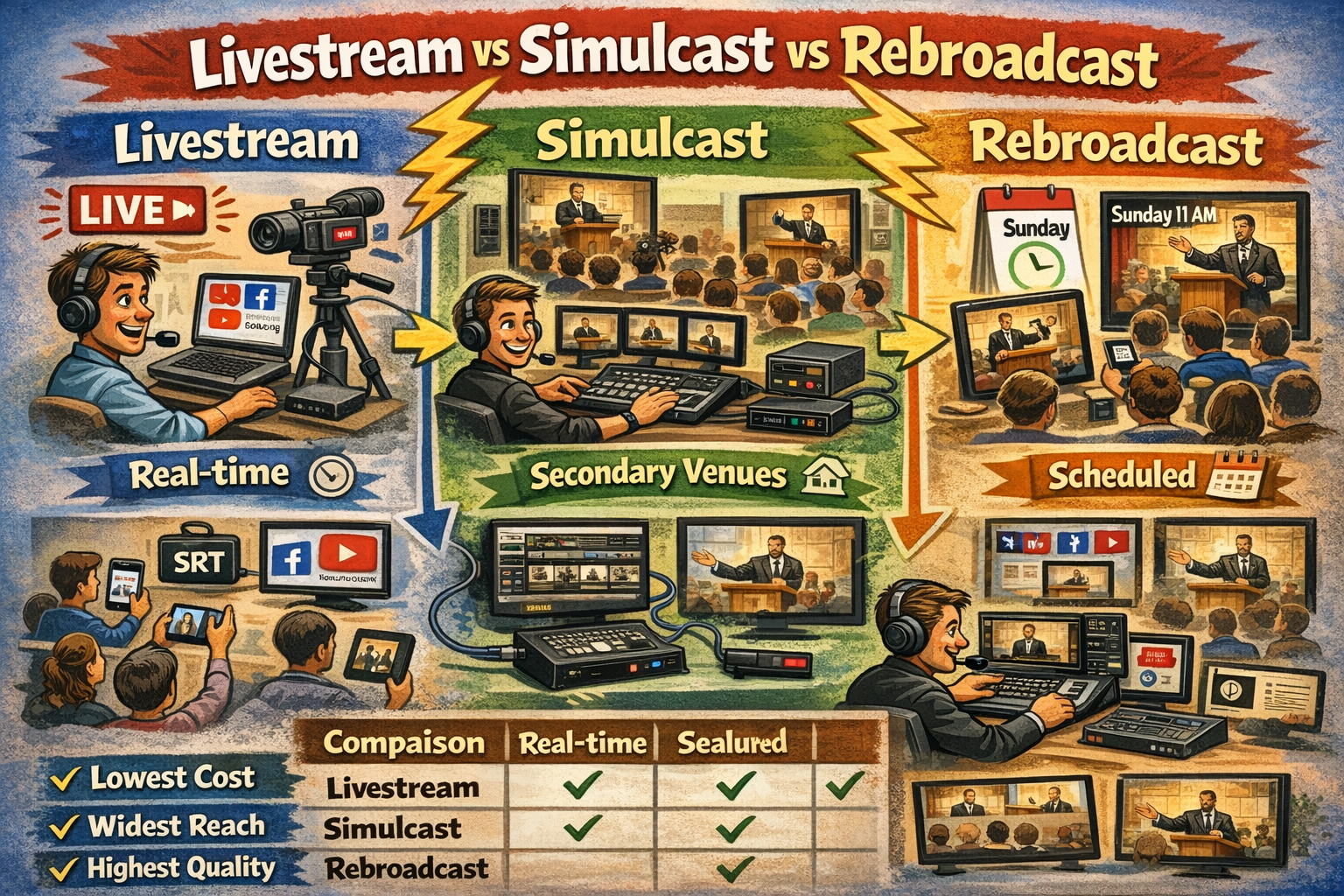
A livestream is a real-time, one-way video broadcast transmitted over the internet from a single origin point to distributed individual viewers. The event is encoded and delivered as it occurs, with typical latency ranging from 2 to 30 seconds depending on the protocol used. Viewers access the feed independently via web browsers, mobile apps, or smart TV applications.
A simulcast — short for simultaneous broadcast — is a live event transmitted in real-time to one or more secondary physical venues, where it is displayed for a gathered audience. The distinction from a standard livestream lies in the destination: simulcasting targets venue-based congregations with large-format displays and dedicated audio systems rather than individual screens.
A rebroadcast is the scheduled playback of a previously recorded event. The content has been captured, optionally edited, and is delivered at a designated time to a remote audience or campus. A rebroadcast is schedule-initiated, distinguishing it from video-on-demand (VOD), which is viewer-initiated.
Classification by Delivery Model
These three distribution methods differ across five primary axes: timing, destination type, latency tolerance, technical complexity, and cost.
| Attribute | Livestream | Simulcast | Rebroadcast |
|---|---|---|---|
| Timing | Real-time | Real-time | Time-shifted |
| Destination | Individual screens | Secondary venue(s) | Individual screens or secondary venue(s) |
| Latency tolerance | 5–30 seconds | Under 5 seconds | Not applicable |
| Technical complexity | Low to moderate | High | Low to moderate |
| Relative cost | Lowest | Highest | Low to moderate |
Livestreaming serves as the broadest-reach, lowest-barrier option. Simulcasting prioritizes fidelity and synchronization for multisite worship. Rebroadcasting decouples content creation from content delivery, enabling time-zone and schedule flexibility.
Technical Requirements
Livestream Infrastructure
A functional livestream requires a camera system, an encoder, an audio feed from the mixing console, and an internet connection with sufficient upload bandwidth. Minimum upload bandwidth for a 1080p stream is 5–10 Mbps; 4K streaming requires 20 Mbps or higher. The encoding protocol is typically RTMP for platform ingestion, though SRT (Secure Reliable Transport) offers lower latency over public internet connections.
Hardware encoders such as the ATEM Mini Pro 2-camera streaming kit eliminate the need for a dedicated streaming computer by handling encoding, switching, and output in a single device. Software-based encoding through applications such as OBS Studio or vMix requires a dedicated computer with adequate CPU and GPU resources, such as a premium streaming computer built for sustained encoding workloads.
The destination platform — YouTube Live, Facebook Live, Vimeo, or a church-hosted player — receives the encoded stream and distributes it to viewers via adaptive bitrate delivery (HLS or DASH). Latency at the viewer end typically ranges from 5 to 30 seconds under standard configurations, or 2 to 5 seconds when low-latency modes are enabled.
Simulcast Infrastructure
Simulcasting inherits all origin-side requirements of a livestream and adds substantial infrastructure at each receiving campus. The origin campus must produce a broadcast-quality feed with multi-camera coverage, professional audio mixing, and redundant internet connectivity.
A multi-camera production setup, such as a 3-camera live streaming kit, provides the multiple angles and production value expected in a venue-to-venue broadcast. The encoded feed must travel over a low-latency protocol — SRT is the current industry standard for contribution-quality delivery over public internet, achieving sub-second latency under optimal conditions.
Each satellite campus requires a decoder or media player, a large-format display or projection system, and a venue-grade audio system capable of reproducing the broadcast mix at full fidelity. Many multisite churches supplement the broadcast feed with local worship teams, campus pastors, and live announcements, creating a hybrid experience that blends broadcast content with in-person elements.
Redundancy is a critical factor. A simulcast failure is visible to an entire gathered congregation, not a single viewer. Bonded cellular backup, secondary encoding paths, and pre-recorded fallback content are standard precautions in professional simulcast deployments.
Rebroadcast Infrastructure
A rebroadcast requires recording capability at the origin event. Most modern hardware encoders and video switchers include built-in recording to USB or SSD storage. The Roland SR-20HD direct streaming AV mixer records simultaneously while streaming, enabling a church to capture content for later rebroadcast without additional hardware.
Post-production editing is optional but common. Many churches edit rebroadcast content to remove delays, correct errors, insert campus-specific announcements, or adjust audio levels. Edited content is then uploaded to a media server, content management system, or streaming platform for scheduled release.
Playback at a satellite campus requires a media player or computer connected to the venue display and audio system. For online rebroadcast, a content delivery network (CDN) distributes the pre-recorded file to viewers at the scheduled time. No real-time encoding, low-latency protocol, or upload bandwidth considerations apply during playback.
Applications in Church Contexts
Single-Campus Churches
Single-campus congregations most commonly implement livestreaming. The primary audience is members who are homebound, traveling, or geographically distant. A budget church live streaming kit provides the minimum viable hardware for a single-camera livestream that replaces smartphone-based setups with consistent, professional-quality output.
Rebroadcasting serves single-campus churches that offer multiple service times with a single teaching team. A sermon recorded during the first service can be rebroadcast during a second or third service time, freeing the speaker for pastoral duties or enabling consistent delivery across all services.
Simulcasting does not apply to single-campus operations.
Multisite Churches
Multisite congregations represent the primary use case for simulcasting. The lead pastor delivers a sermon from the main campus, and satellite campuses receive the feed in real-time. According to data from Leadership Network, the number of multisite church locations in the United States grew from approximately 5,000 in 2012 to an estimated 10,000 or more by 2024, indicating sustained adoption of this model.
Rebroadcasting serves multisite churches where campuses operate at staggered service times or across different time zones. A 9:00 AM service at the main campus can be rebroadcast at 11:00 AM at a satellite campus, or a Sunday morning service in the Eastern time zone can be rebroadcast for a campus in the Pacific time zone.
Many multisite churches employ a hybrid strategy, simulcasting one or two service times and rebroadcasting the remainder. This approach balances the communal energy of a live feed with the scheduling flexibility of pre-recorded content.
Event and Conference Broadcasting
Denominational conferences, guest speaker events, and special services often require simultaneous distribution to multiple churches or venues. Simulcasting is the standard approach for real-time event distribution, while rebroadcasting extends the content lifecycle beyond the live event window.
Livestreaming provides the broadest reach for events that target individual viewers rather than gathered congregations. An all-in-one encoding solution such as the YoloBox Pro portable multi-camera streaming studio enables event livestreaming from temporary or mobile setups without a full production infrastructure.
Comparison of Operational Considerations
Staffing and Expertise
Livestreaming requires a minimum of one trained operator to manage the camera, encoder, and streaming platform. A multi-camera livestream typically requires two to four operators: camera operators, a switcher/director, and a graphics operator.
Simulcasting requires the full origin-campus production team plus technical staff at each satellite campus to manage local playback, audio, and any hybrid production elements. The combined staffing requirement scales linearly with the number of campuses.
Rebroadcasting shifts the labor from real-time operation to post-production. A single editor can prepare rebroadcast content, and playback can be automated or managed by a single operator at the receiving campus.
Reliability and Failure Modes
A livestream failure affects individual viewers, who may refresh, reconnect, or switch devices. The failure is distributed and individually manageable.
A simulcast failure affects an entire gathered congregation simultaneously. The operational and reputational impact is substantially higher, necessitating redundant systems, backup feeds, and contingency plans.
A rebroadcast has the lowest failure risk because the content exists as a completed file before playback begins. Failure modes are limited to local playback equipment or CDN availability, both of which are straightforward to troubleshoot.
Cost Structure
Livestreaming has the lowest cost of entry. A single camera, a hardware encoder, and a free platform account constitute the minimum viable investment. Total hardware cost for a basic setup ranges from approximately $500 to $2,500.
Simulcasting carries the highest cost. Origin-campus production equipment, low-latency delivery infrastructure, and receiving-campus hardware at each satellite location create a cumulative investment that scales with the number of sites. Total cost per satellite campus — including decoder, display, audio, and network infrastructure — typically ranges from $10,000 to $50,000 or more depending on venue size.
Rebroadcasting costs fall between the two. Recording hardware is typically included in existing streaming equipment. Incremental costs include editing software, storage, and playback hardware at receiving campuses.
Product Integration Summary
The following table maps distribution methods to relevant hardware categories and representative products.
| Distribution Method | Key Hardware | Representative Product |
|---|---|---|
| Livestream (single camera) | Camera + encoder | Budget church live streaming kit |
| Livestream (multi-camera) | Cameras + switcher/encoder + computer | 2-camera live streaming kit |
| Simulcast (origin campus) | Multi-camera + switcher + encoder + redundant network | 3-camera live streaming kit |
| Simulcast (portable/event) | All-in-one encoder/switcher | YoloBox Pro portable studio |
| Rebroadcast (recording) | Switcher with built-in recording | Roland SR-20HD streaming AV mixer |
| Rebroadcast (encoding) | Dedicated encoding computer | Premium streaming computer |
| Multi-camera production | Dedicated multi-cam processor | Premium multi-cam streaming computer |
Decision Framework
Selecting between livestream, simulcast, and rebroadcast depends on four factors: campus topology, timing requirements, budget, and acceptable latency.
Single-campus, broad reach, budget-conscious: Livestream is the appropriate method. It requires the least hardware, the fewest operators, and provides the widest distribution.
Multisite, simultaneous services, high production value: Simulcast is the appropriate method. It preserves the gathered-worship experience and delivers consistent teaching across all locations in real-time.
Multisite or single-campus, staggered times, post-production desired: Rebroadcast is the appropriate method. It decouples recording from playback, enabling editing and flexible scheduling.
Hybrid deployments are common and often optimal. A multisite church may simulcast its primary service time, rebroadcast to campuses on different schedules, and livestream to an online audience — all from the same production feed. The hardware investment at the origin campus serves all three distribution methods simultaneously.