
Blog
Finding the Best Live Stream Setup for Church in 2023


If you’re looking to upgrade the live stream of your church in 2023 you’re probably shopping for some gear right now. But there are so many different combinations of gear, different brands of cameras, and different video switchers…
There are just so many different combinations, it’s difficult to know what would be the best fit for your church’s needs.
We want to help you figure out what is the best live stream setup for your church for the new year.
Building the Best Live Stream Setup for Church
It would be impossible to really say ‘this one build is the best setup you can possibly get.’ Every church is different, s you need something that matches your specific youth case rather than a one-size-fits-all solution
So, in this article rather than trying to push a particular live stream setup, we’re going to give you some things to think about so you can choose the one that actually fits your needs. And for most churches, what they’re looking for is simple, yet professional results.
What makes a lifestream look professional?
There are seven things that make a lifestream look like it is professionally done, and we will quickly walk through each of these:
1. A Clear, High-Definition Image
The first thing that you need to consider when you’re building a live stream setup is what kind of image is going to appear to your users. You should consider the gear you buy from the eyes of those that are going to be watching your live stream, not those that are going to be operating it. You can get a really cheap camera but if those who are watching your live stream can’t see a clear image it’s never going to look professional. So the first thing that needs to be decided is if a camera, or a live streaming kit, going to look good on the live stream.
2. Good Lighting

The next thing that’s going to make an impact on a good clear image is your lighting. A lot of cameras even the cheap ones can get a great image if there is sufficient light for their sensor. What separates expensive cameras from cheap cameras is often their low-light performance.
So if your church has really bad lighting, you’re going to need to compensate with better quality cameras. However, that doesn’t necessarily mean you have to spend a fortune on your cameras either.
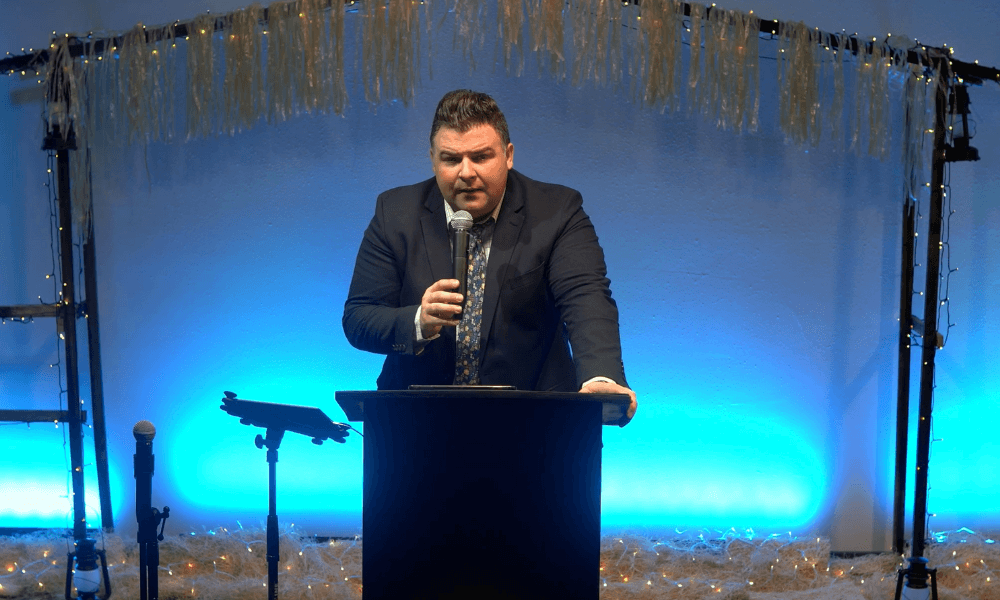
Here’s an example from my church. Our lighting is very, very bad lighting. Even in well-lit areas. The lighting is bad.
You can see from this example that the lighting is really limited to the platform area and only a small area of the platform. When someone moves out of that small little area. They quickly get into shadowy areas of the platform, especially if they step down the front,
The footage that you’re looking at here is from a PTZ optics PTZ camera which traditionally does not really perform that great in low light. However, the exposure settings allow us to dial in an image that is OK but you can tell when we move out of the light, everything gets dark. The image looks nice, but you’re not clearly seeing what’s going on because someone is in the dark, that’s because of the low dynamic range of the PTZ optics cameras. Granted, this is extremely low light. Most churches will have better lighting than this on their subjects.
From talking to a lot of churches over the years changing or adapting their stage lighting is probably harder than it sounds. Most churches won’t actually change their lighting. So when you get your cameras, you have to make sure that they perform well in the light and that you spend time dialing in the exposure so that the image still looks good even if the lighting is bad.
3. Good Exposure Settings
As we said in the previous section, you can overcome lighting and still get a great image. If your camera is good quality and if you spend the time to dial-in good exposure settings.
There are really three different settings you’ll have to adjust.
The first setting is your aperture. This is basically how wide your camera’s eye, or lens, is opening and therefore how much light is actually getting to the camera sensor. In a really low-light situation, you want a lower aperture. And in a really bright situation, you want a higher aperture. Just be aware that your depth of field, that is how deep the ranges of how much will be in focus will get shallower the higher aperture you use
So at 50 feet, a 1.4 aperture might have a depth of focus of 4 to 5 feet. At 50 feet a 5.0 aperture may have a depth of focus of 10 to 12 feet.
So if you have a large stage and you want a lot of that stage to be in focus, you want to keep that in mind and compensate by setting your aperture to the correct focal length.
The second setting is the ISO. This is basically the volume knob for how bright your images. And just like audio, if you turn the volume knob up to high, you’ll get noise. If you turn the iso up to high, your image will be noisy. Most cameras have what they call a native iso. Finding out what this is will allow you to set that iso to that particular setting to get the best quality image, then you can adjust from there.
The third setting is white balance. Setting your white balance and locking it in will be critical especially if your church uses colored stage lights. If you leave your cameras on auto white balance, the image is going to shift from warm to cold, depending on the colors of the lights that you’re using. And this could be a really disjointed experience from the viewer’s standpoint.
4. Good Camera Operation
Now that you have your gear set up properly, the next thing that will really impact the experience of the viewer is the production quality of your live stream. And production quality really depends on the choices. Your producer makes in real-time.
For example, if someone stands up to speak, but the producer switches to a camera that is focused on the keyboard rather than the speaker, the live stream will feel amateurish and disjointed. Also, if the camera movement is way behind the action, trying to catch up to someone that’s walking or not switching to the correct view when something is pointed out, this will also fill amateurish.
If the speaker references a slide or a picture and your producer doesn’t switch to that picture right away the viewer will be frustrated because they’re not seeing what everyone else is seeing in the room.
Another thing that makes a lot of church live streams. Look amateurish is when a PTZ camera is being used, or even a handheld and the movement of the camera shows to the live stream. In professional productions, camera movement adds an artistic quality to the footage. But without the cranes and Jim’s professional broadcasting studios employing camera movements are often jumpy and not fun to watch. A good live stream producer will move the camera that is not showing to the live stream, get that camera framed, and then show it to the lifestream while they move the other cameras into place.
5. Use At Least 2 Cameras
The previous paragraph is why this section is so important. Having a second camera allows you to switch to that camera view while you move the other camera or cameras into place. That way the live stream is always seeing a well-framed image even when you’re moving cameras around, they’re not watching that disjointed movement which is distracting.
Having three cameras is awesome having two is great and having one is OK if you can’t afford more. But if it’s within your budget, having at least two cameras will make your lifestream feel much more professional.
6. Easuy Volunteer Operation
It’s possible to have a highly professional live stream using volunteers that have no experience in video production.
However, if you overwhelm them with all kinds of gear with software outfitted with bells and whistles and complicated commands and movements of the cameras.
Churches with paid video staff will, of course, have a better time with the more complicated setups. However, churches that rely on fully unpaid volunteers will need to simplify. Simplification does not mean amateurish in most cases, the easier it is to operate your live stream equipment the more professional, your lifestream will appear, even if you’re not using all the bells and whistles, more professional live streams employ,
For the viewer having a well-produced live stream will feel great even if you don’t have a lot of animated graphics, sound effects, and things like that. For most churches, a simple pushbutton system will enable their volunteers to produce a live stream their viewers, love, and that they can be proud of.
7. An Affordable Setup
And the last thing that will impact the quality of your lifestream will be the equipment that you choose to use. In most cases, especially with cameras, you get what you pay for is a true saying. Getting the best possible equipment for your budget will go a long way in making your lifestream better.
Large churches will often pay over $100,000 for their video and live streaming equipment. They’ll have a dedicated room for their live stream production crew. They’ll have an intercom system communicating with every cameraman and their live stream sound engineer.
Larger churches with this kind of budget will need to work with a professional that can come on-site and help them construct a system to fit their larger production requirements.
Then there are churches that will spend between 50 and $100,000. These churches are very similar to the larger churches in the process to get the live stream equipment purchased and installed, they will most likely work with some kind of local video company and if that’s not available work with a local A/V technician.
And then there are churches with a budget of under $50,000 down to the small start-up churches that only have a couple of thousand dollars to spend on their live stream set up. Whatever your budget is getting whatever is available to you even if it’s using an iPhone is a great choice. I like to tell our customers that there are no wrong choices. There’s only right and more right.
I will say that most of our customers are highly satisfied with their live streaming setup or ones that spend between 10 and $20,000 on their equipment. Our customers that spend around $15,000 get a 3 to 4-camera setup that is easy for their volunteers to run and that features high-quality PTZ cameras that work great in a church environment.
If you have this kind of budget to spend, I highly recommend looking at the Birddog 3 Camera kit, as it is my favorite of all the kids that we sell. It’s perfectly balanced between low-cost and high production value.
Get What Works For You and Make It Work
Like I said before, there is a balance between the gear that you purchase and the skill of your live stream producer. If you get the best quality gear that your budget allows matched with someone who is willing to learn the best practices of how to stream how to produce a quality show and how to choose the right camera shots to provide a great experience for the viewer. You will have a professional lifestream.
But you can have the most expensive gear and if your volunteer just doesn’t want to learn how to use it it’s not going to live up to its potential.
If you’re interested in looking at our live streaming kits, we have them built for churches at a bunch of different budget amounts and you can do them in our store here.